Mouse Clicking Script
Create a Macro Script to Automate Mouse Clicking easily and quickly. With Auto Mouse Click Software you can script any repetitive Mouse Clicking Task. Whether you wish to automate Left Mouse Click, Right Mouse Click, Middle Mouse Click, Double Left Button Click, 4th Mouse Button Click or even 5th Mouse Button Click, now you can simply run a Macro Script and let the Script do the Clicking for you.
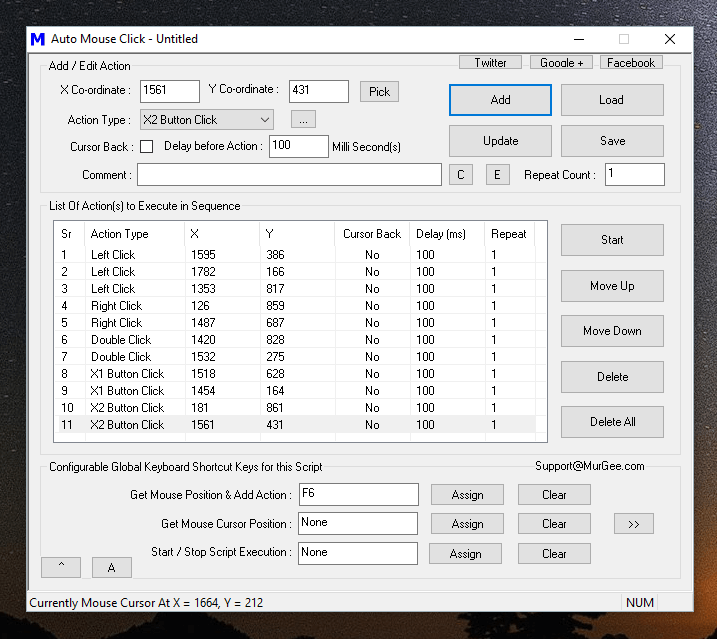
The above Screenshot displays a simple Mouse Clicking Script containing various types of Mouse Clicks. Yes you can Loop the Script so that it runs Multiple Number of times or let it loop indefinitely so that you can stop it later with a Keyboard Shortcut. Given below are the types of Mouse related Actions which can be Scripted with the Auto Mouse Click Software Utility.
- Left Mouse Click : This is pressing of Left Mouse Button and then Releasing it commonly known as Mouse Click.
- Right Mouse Click : This Mouse Action is pressing and then releasing the Right Mouse Button. The Right Click is commonly used to invoke the Right Click Menu or also known as Context Menu. Lots of Applications support automating Right Mouse Click with Keyboard Shortcut Shift + F10.
- Middle Mouse Click : Middle Mouse Click is basically pressing and then releasing the Middle Mouse Button. Depending on your Mouse Hardware, your Mouse may have a Scroll Wheel which you can manually Click and Scroll Up or Scroll Down.
- Scroll Up and Scroll Down : This Mouse Action is basically rolling the Scroll Wheel on your Mouse in Upwards or Downwards direction. Scroll Up and Scroll Down is a quick alternative to moving the Vertical Scroll Bar in upwards or downwards direction.
- X1 Button Click : This Mouse Action is basically pressing and releasing the 4th Mouse Button on your Mouse. Yes even if your physical Mouse does not have the 4th Mouse Button, you can still Automate this Mouse Action. Pressing the 4th Mouse Button is by default used in Browsers to navigate to the previous page.
- X2 Button Click : This Mouse Action is basically pressing and releasing the 5th Mouse Button on your Mouse. Yes even if your physical Mouse does not have the 5th Mouse Button, you can still Automate this Mouse Action. Pressing the 5th Mouse Button is by default used in Browsers to navigate to the previous page.
- Move Mouse : This Action relocates Mouse Pointer to a pre-defined Mouse Location instantly. As compared to physical Mouse Movement, this Automated Mouse Movement, relocates the Mouse Pointer instantly.
- Begin Dragging : This Mouse Action basically presses Left Button of Mouse and is commonly followed by Mouse Movement and then finally with releasing the Mouse Button in order to complete the Mouse Drag and Drop Process.
- End Dragging : Releasing of Left Mouse Button is done by this Mouse Action. The End Dragging Action marks the completion of a Drag and Drop Mouse Operation. In order to Script a Mouse Drag Drop, you would need 3 Actions in order. A Scripted or Automated Drag and Drop operation should have first Mouse Action as Begin Dragging, then Move Mouse and finally End Dragging.
As displayed in the list above you can create a Script to Automate almost every type of Mouse Action. Yes Mouse Actions are really easy way to Automate a Repetitive task, however the Mouse Clicking Script does not understands the Window or Screen Location to which it is sending Mouse Actions. Mouse Clicking Script can also be affected by changes in Screen Resolution, Position or Size Change of the underlying Window, presence or absence of a specific Window or Popup.
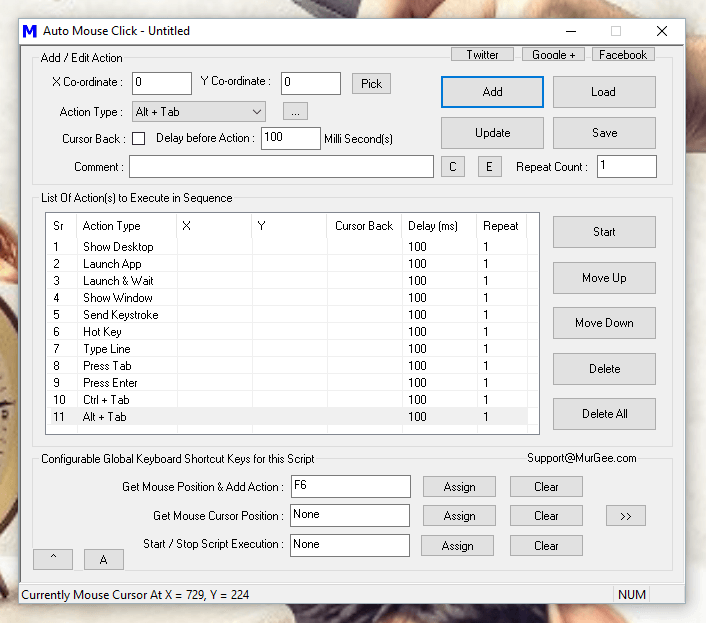
In order to assist the Mouse Clicking Script to accurately do the Mouse Clicking, you can utilize given below Script Actions whose outcome is not directly dependent on Screen Resolution. Yes you need to carefully plan your Mouse Clicking Script and utilize only those actions which are fit for your purpose.
- Show Desktop : This Action Displays Desktop so that you can Start running your Automation Script. The Action basically send the Window + M Keyboard Keys to Desktop in order to Show the Desktop.
- Launch App : This Action can be used to Open a Website in Default Browser, Launch an Application or Open an existing Document.
- Launch & Wait : This Action works similar to the Launch App Action, however it waits for the Application Launched to be Closed. Effectively your Next Action in the Script will not be executed until the Application Launched by this Action has terminated.
- Show Window : This Action displays a Window Identified by the Title of the Window. In case you have Launched an Application to do Mouse Clicking, but the Application’s Window is Minimized or Hidden, you can use this Action to Show the Window on your Computer’s Screen, so that your Script can do the Automated Mouse Clicking, Key Pressing, etc.
- Send Keystroke : This keyboard Action allows you to send a single Keystroke to the Active Window or to Send a Keystroke to a Specific Window.
- Hot Key : In order to send combination of Keystrokes like Ctrl + C, Ctrl +V or even Ctrl + Shift + F10, you can use this Hot key Action to send Multiple Keystrokes to Active Window.
- Type Line : This Action simulates Typing of Text Sentence, pressing of special Keys like Enter, Tab, Function Keys or any combination of Keys. Once you have Added the Type Line Action to your Script, double click on the Action to view available options of associated help.
- Press Tab : With the help of Tab Key, you can Move the Input Focus to Next Control on your Desktop Application, Web Page or any other Application. In order to navigate to Previous Control, you can Automate Shift + Tab Key with the help of Hot Key Action.
There are lots of other Actions available in this Auto Mouse Click Application which can help you setup an unattended Automation Script to do repetitive tasks. In case you intend to use the Mouse Clicking Script in a Desktop Game using Direct-X or Open-GL technologies, you might wish to consider running the Admin Version of the Application.
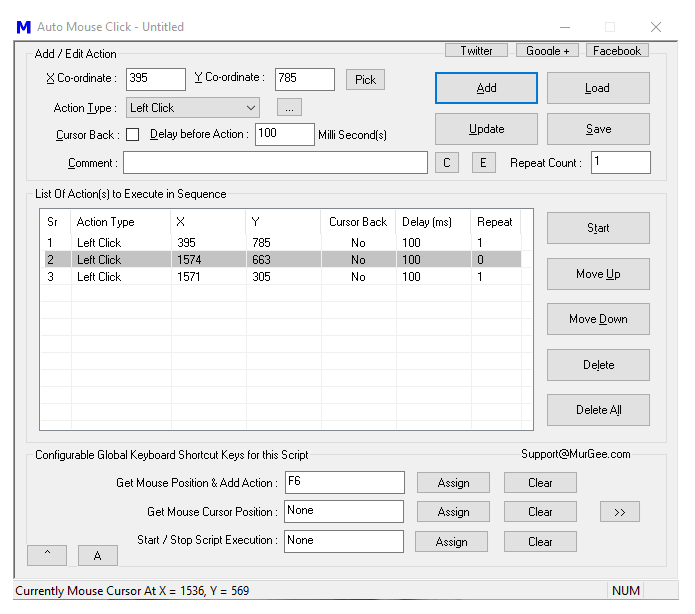
The Actions added to the Script are run in order, however if an Action has been assigned a Repeat Count of more than 1, the next action would have to wait so that all previous actions have completed their assigned task. You can even disable any task by assigning the repeat count of 0 to any action and the Script Editor displays the Disabled Actions with different background color.
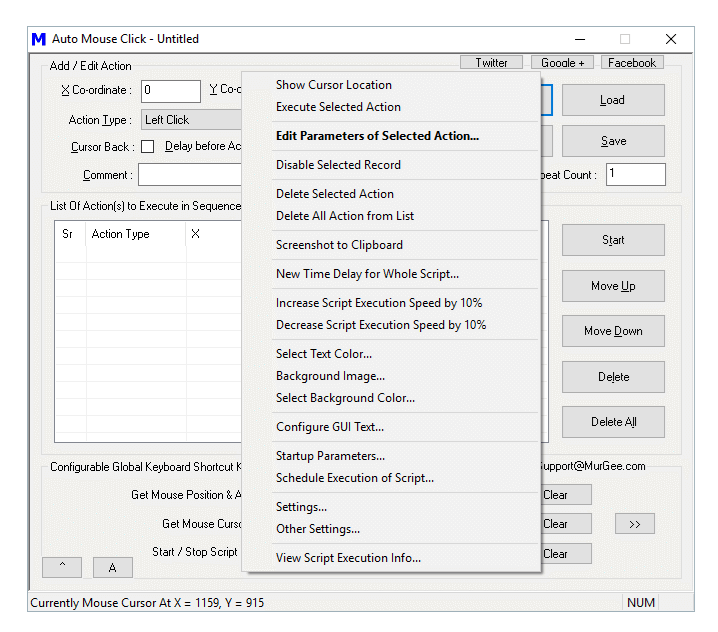
There is no coding required for using this Auto Mouse Click Application to Automate Mouse Clicking or other Actions on your Windows Computer. Scripting here relates to Automation Script containing Mouse Clicking and other Actions. This is a really sophisticated and yet easy to use Windows Automation Tool. Lots of Configurable Options are available in the Right Click Menu of the Software and there are some helper Tools available in the System Menu of the Software as well.
Download this unique Application and give it a try to Automate Mouse Clicking with a Script in a Game, Web Page or any other Software which is taking too much of your efforts. Creating Bots for your Game, Automated Text Typing and virtually anything can be Automated with this Free to Download and try Windows Automation Application.